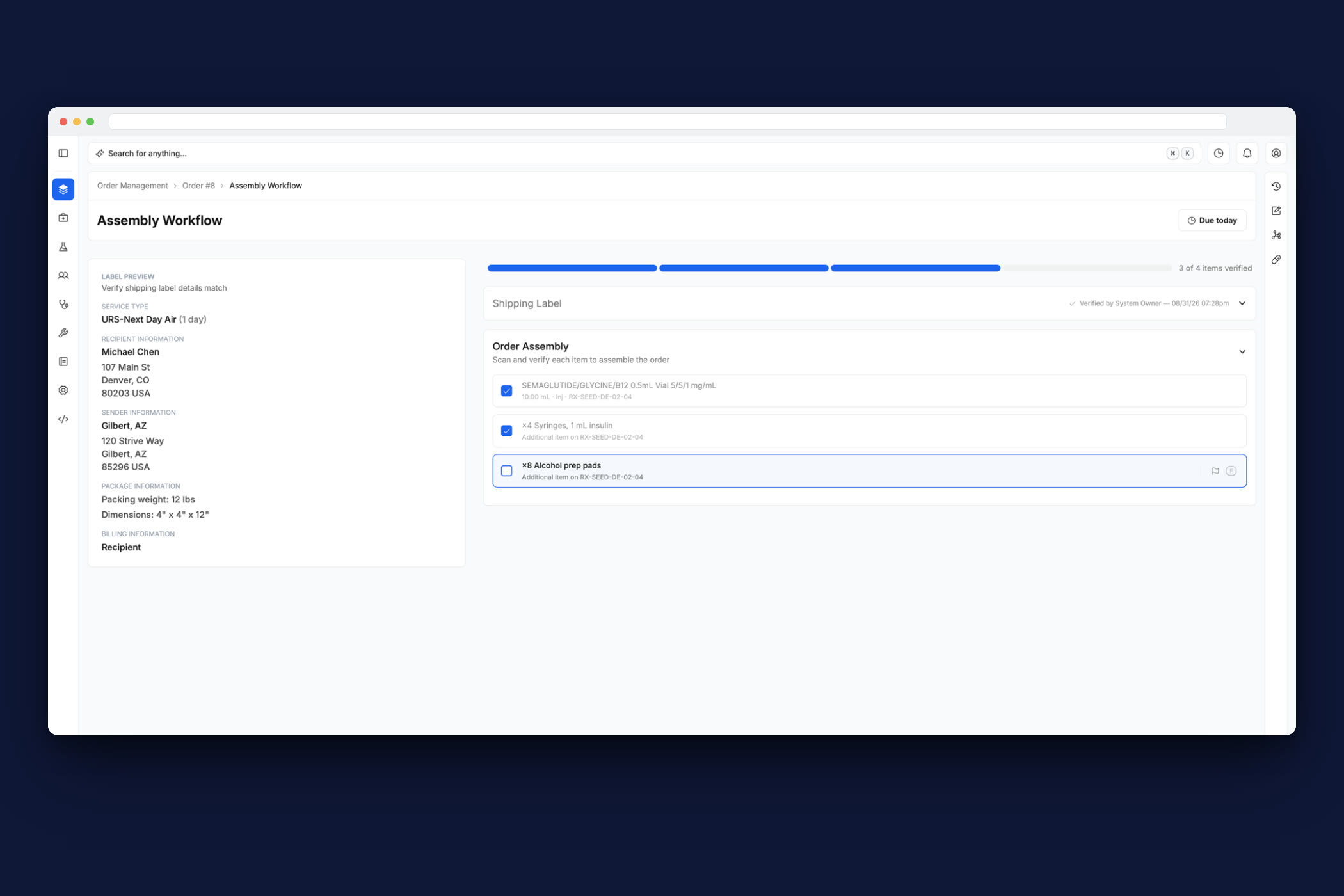
Due to HIPAA compliance, I’m only able to show a prototype version of the product, which I created myself. The prototype seeds data that replicates that of a real order from a provider. No real patient information appears anywhere.
A new & improved pharmacy management system for Strive Pharmacy
Due to HIPAA compliance, I’m only able to show a prototype version of the product, which I created myself. The prototype seeds data that replicates that of a real order from a provider. No real patient information appears anywhere.
This is Strive Pharmacy in partnership with Hims & Hers — Strive fulfills GLP-1 medications for Hims & Hers. The scope of what is fulfilled by RxVortex is solely on GLP-1s for Hims/Hers like semaglutide, glycine B12, and tirzepatide. The majority of compounding pharmacies make most of their revenue through GLP-1 medications. While Strive has diversified their portfolio of compounded medications, when it comes to Hims/Hers specifically, the focus is GLP-1’s, which require unique handling and consideration.
Hims & Hers did about $725 million in weight-loss revenue last year, and Strive is one of the pharmacies fulfilling it. The volume and revenue was high, but we knew we could take it to the next level when we learned more about the current pain points the technicians, pharmacists, and business-related stakeholders were each facing.
I conducted research with providers, pharmacists, and technicians, then designed the workflows end to end, the interaction design and the interface, and built them in the product’s own codebase, opening pull requests for the engineering team to review. Everything below was tested against real seeded data, running in the app, rather than as mockups. Also, it is worth noting this is the first pharmacy management system ever made (in the world) using Elixir instead of Javascript. This presented its own special set of technical constraints, but it also gave us a lot of technical leverage for the problems we were facing. Elixir/Phoenix LiveView allow the PMS to ingest orders in real time and users are able to receive live updates across the system from where ever they are working.
Strive Pharmacy currently uses a pharmacy management system called LifeFile. The problem is that it’s very outdated, it’s very noisy, it’s very hard to navigate — it’s a very dense experience overall, so the learning curve is steep. It’s also the sort of software where they have to do everything manually. There’s very much a LifeFile way of doing things for every kind of task you can think of, and it creates a lot of extra work for them.
It’s also very hard to keep any sort of traceability in the app, and hard to get cross-functional communication through it — comments between departments, or even getting any kind of visibility between departments, is extremely hard in LifeFile. But ultimately, the main problem is just the level of errors it produces. You put in an order, and from start to finish there’s an extreme amount of churn to get it through all the way, because there are so many different manual checks all over the place — to the point where it’s just slow. They get behind. They ship orders late. Sometimes orders just get stuck. Simply stuck.

Order management is the heart of it, but RxVortex covers the operation end to end:
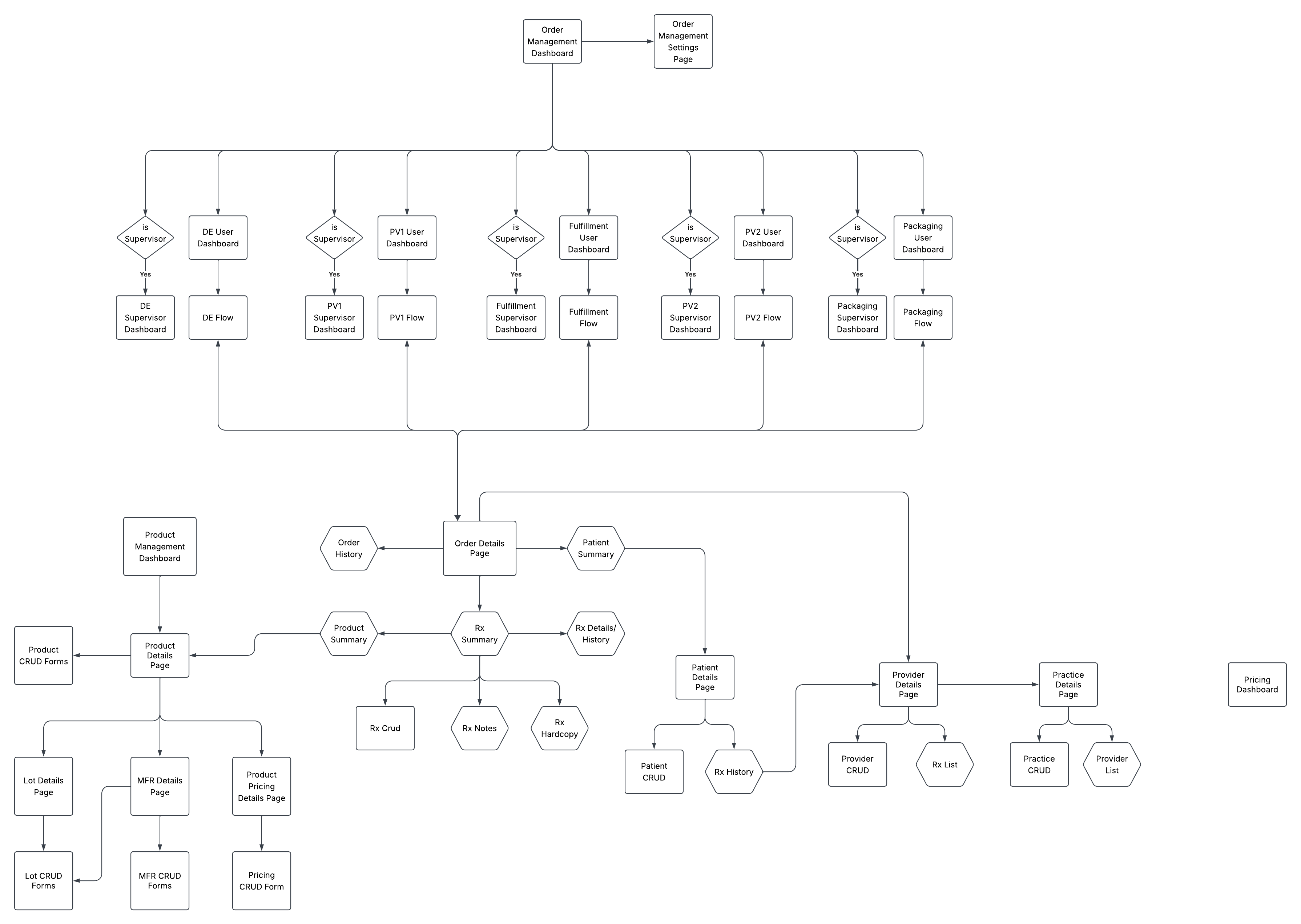
An order moves through Data Entry (a data entry technician), PV1 (a PV1 technician), Fulfillment (a pharmacist or technician), PV2 (a pharmacist — it’s a pharmacist verification), and Assembly. Then it hits Packing/Shipping, a purely physical station — we don’t build any UI for it. The only thing the system does there is make a backend call to the shipping provider to get status on the order.
Each work area got a custom workflow and a modular dashboard specific to how that station receives work.
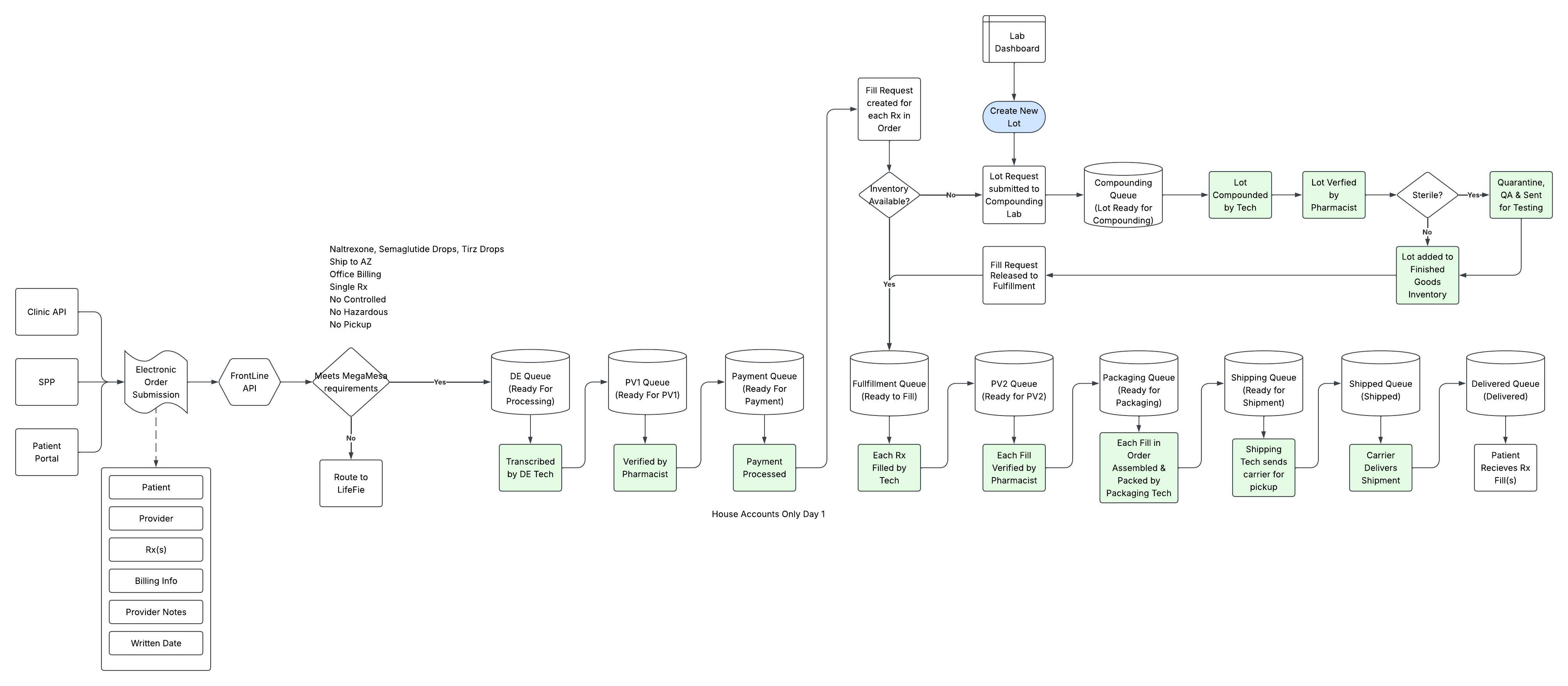
Stations like Data Entry and PV1 are given a next-order component on their dashboards — and the order is pretty much forced on them. The reason is that technicians will cherry-pick orders they think will be easier. The next-order component feeds them an order automatically, so we eliminate cherry-picking. That’s a business pain point, not a user pain point — obviously they’d love to cherry-pick orders, but that’s not good for the business. We fixed that for the business, to make the PMS more efficient.
Other stations are what we call scan stations — Fulfillment, PV2, and Order Assembly. A scan station doesn’t get fed an order the same way: they scan something to start an order, in whatever order they receive the item. They don’t have the cherry-picking pain point, because they’re fulfilling different needs for the order.
Fulfillment scans a lot, then weighs and fills the prescription. PV2 scans the barcode Fulfillment prints at the end of its work cycle — that scans in the prescription on the bottle. Order Assembly scans that prescription label too, then prints a shipping label. And Packing scans the shipping label.
It’s a two-sided thing: we thought about the business pain points, but we also addressed a lot of the technician and pharmacist pain points — largely around how they document, track, and resolve issues — through automation and traceability.
Data entry is queue-fed: the technician starts the next order and is fed the original document alongside the system’s record. They verify the information matches, make pharmacy-side changes where needed, and records update in real time.
When something is wrong, they flag a section issue — patient information, prescriber information, Rx information, or shipping information — and it routes to an Issue Hub, where another technician can fix it in the system in real time. Resolved issues send the order back into the queue. In version one, clinical and routing issues are still worked through HubSpot, which Strive uses third-party — anything data-related to the patient is solved inside RxVortex.


As an order moves through the line, people flag issues as they see them. The issue bounces to the Issue Hub if need be, gets resolved, and the order comes back into the queue. The hub shows who flagged it, where it originated, which section, and how long it’s been waiting.


PV1 is the standard of the pharmacy world: a senior technician double-checks patient information, prescriber information, Rx information, billing, delivery, and a QR review — comparing what was typed into the computer against the original prescription hard copy.
It’s part of HIPAA, it’s needed for DEA regulations, and it’s quality assurance for the platform all at once.


At fulfillment, the lot gets picked, scanned, weighed, visually inspected, labeled, and binned for PV2. There, a pharmacist runs the secondary physical verification: free of particles, separation, and discoloration; fill amount correct; container and closure intact.
Assembly prints the shipping label — defaulted to UPS Next Day Air, because GLP-1 medications ship cold — then verifies the medication and every ancillary supply, alcohol prep pads and syringes included, is in the box. Packing packs it up and ships it out with what assembly handed over.
All along the line, issues get flagged as people see them, bounce to the Issue Hub, get resolved, and come back into the queue — with patient notes carrying the context for any change made at the order or patient level in real time.


The crux of it all: we know the users are really keyboard-heavy users. So we took their current workflow and lifestyle and applied a super-user workflow on top of it, where they can just key-bind through everything they need to get through very quickly.
And not only can they do it with a keyboard — there are accessibility concerns too. If they don’t want to work that way, they can still use a mouse to get through everything. Through that, we reduced the time it takes to get through an order by more than 70%.
We effectively sped up orders by a significant amount — but we also created space for traceability, through audit logging and issue tracking. A lot of the reason this push happened was to get transparency-related metrics and be able to see across the entire order pipeline.
In LifeFile, things would be sent to a problem bucket, get lost, and then that order would just never be made. RxVortex doesn’t just help those situations — indirectly, it increases revenue too. Orders that get lost end up getting canceled, and that leaves a bad impression on customers. They aren’t going to be repeat customers if they’re having order issues.
That $725 million a year happened with every order churning through LifeFile. Cut the time per order by 70% and the same stations can handle more than three times the orders. There’s a lot of room for that number to grow.